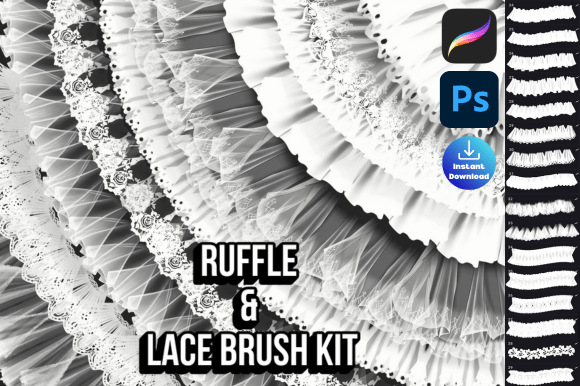
Procreate Photoshop Ruffle Lace Brush Pack
Unlock Creative Detailing with 50 Unique Brushes
Adding intricate textures and elegant embellishments to digital artwork can transform a good design into a stunning one. The Procreate Photoshop Ruffle Lace Brush pack gives creators a versatile toolkit of 50 unique brushes designed specifically for Procreate and Photoshop. Whether you're illustrating, designing fashion, or crafting digital scrapbooks, this brush set brings depth, texture, and refinement to your work.
Each brush in the pack offers a distinct ruffle, lace, or trim pattern. From soft frills to structured ruched bands, these brushes allow for seamless layering and customization. They're especially useful for designers who want to add ornamental touches without spending hours drawing every detail by hand.
How to Use the Ruffle Lace Brush Pack Creatively
This brush set is more than just decorative—it's a practical tool for visual storytelling. Here are some creative applications across different fields:
- Fashion design: Quickly add lace overlays, ruffled sleeves, or scalloped hems to your garment sketches.
- Surface pattern design: Create textured backgrounds, borders, or repeat motifs with ease.
- Editorial illustration: Enhance editorial pieces with vintage-inspired ruffles or ornamental flourishes.
- Wedding and event design: Use the lace brushes to mock up digital invitations, decor elements, or floral arrangements.
- Digital scrapbooking: Add delicate trims and vintage ruffles to photo albums and memory pages.
Because each brush is pressure-sensitive and customizable, you can adjust opacity, flow, and size to suit your style. This flexibility makes the Procreate Photoshop Ruffle Lace Brush pack suitable for both loose, expressive work and precise, detailed design.
Design Tips for Best Results
To get the most out of your brush set, consider these practical tips:
- Layer with intention: Apply different ruffle brushes on separate layers so you can edit or adjust them independently.
- Mix with other textures: Combine lace brushes with fabric, paper, or watercolor textures to create depth and contrast.
- Use clipping masks: Clip ruffle brushes over shapes or illustrations to maintain clean edges and organized layers.
- Vary your strokes: Experiment with brush direction and pressure to create natural, hand-drawn effects.
- Customize brush settings: Adjust spacing, scattering, and grain to match your project’s style and technical needs.
These small adjustments can significantly impact the final look and feel of your design. Don’t be afraid to explore how each brush behaves under different settings.
Who Can Benefit from This Brush Pack?
The versatility of the Procreate Photoshop Ruffle Lace Brush makes it ideal for a wide range of creative professionals and hobbyists:
- Freelance designers: Speed up your workflow by using pre-made ruffle and lace brushes for client projects.
- Bloggers and content creators: Enhance digital graphics, headers, or quote images with elegant textures.
- Small business owners: Use the brushes to design packaging, social media visuals, or product mockups with a refined touch.
- Educators and hobbyists: Teach or learn design fundamentals using real-world tools that add visual interest to digital art.
Whether you're designing for print, web, or personal expression, this brush set helps you achieve polished, professional results with minimal effort.
Organizing Your Digital Workflow
When working with a large brush set like the Procreate Photoshop Ruffle Lace Brush, organization is key. Here’s how to stay efficient:
- Group brushes by style: Organize your brush library into folders like “Laces,” “Ruffles,” and “Trimmings” for quick access.
- Use brush presets: Save your favorite brush settings so you can jump right into creating without adjusting every time.
- Label your layers: Name and group layers by element type—like “Background,” “Main Illustration,” and “Trim Details.”
- Backup your brush set: Keep a copy of the original .ABR and .brushset files in case you need to reinstall or share brushes across devices.
These habits help maintain clarity and consistency, especially when working on complex or long-term projects.
Real-World Project Ideas to Try
Here are a few specific project ideas that highlight the brush pack’s potential:
- Romantic-themed poster: Use lace brushes as overlays on a soft color palette to create an ethereal, vintage-inspired design.
- Patterned greeting cards: Combine ruffles and trims with floral or geometric elements to design digital card templates.
- Character illustration: Add ruffled collars, lace sleeves, or decorative borders to character designs for a unique style.
- Brand identity mockup: Integrate subtle lace textures into logo designs or packaging concepts for a boutique aesthetic.
- Textured digital journal: Use ruffle brushes to embellish digital pages for art journals, planners, or vision boards.
These examples show how the same brush set can be adapted for different styles and audiences, making it a valuable asset for any creative toolkit.
Getting Started with Installation
After downloading the ZIPPED file, you’ll find both .ABR (Photoshop) and .brushset (Procreate) files inside. Installation is straightforward:
- For Photoshop: Open the Brush panel, click the gear icon, and choose “Load Brushes.” Navigate to the .ABR file and load it into your library.
- For Procreate: Open the Brushes app, tap the “+” icon, and import the .brushset file. Your ruffle brushes will now appear in your brush list.
Once installed, you can start experimenting with different brushes and settings right away. Remember, the best way to learn is by doing—so don’t hesitate to dive in and start creating.
Final Thoughts: Elevate Your Digital Art with Purpose
The Procreate Photoshop Ruffle Lace Brush pack is more than a set of digital tools—it’s a way to enhance your creative expression with elegance and efficiency. Whether you're a professional designer or a weekend hobbyist, these brushes offer a practical way to add intricate detail without sacrificing time or originality.
If you enjoyed your purchase, consider leaving a 5-star review. It helps creators continue offering high-quality tools like the Procreate Photoshop Ruffle Lace Brush. Thank you for supporting creative resources that empower your work and inspire your imagination.