Sweet Dessert Procreate Brush Set: A Practical Tool for Digital Artists and Designers
For digital artists, illustrators, and designers using Procreate, the Sweet Dessert Procreate Brush Set offers a curated collection of brushes designed to enhance creative workflows. Whether you're illustrating for a client, developing visual content for social media, or exploring personal art projects, this brush set can streamline your process by providing consistent, high-quality textures and patterns tailored for dessert-themed artwork.
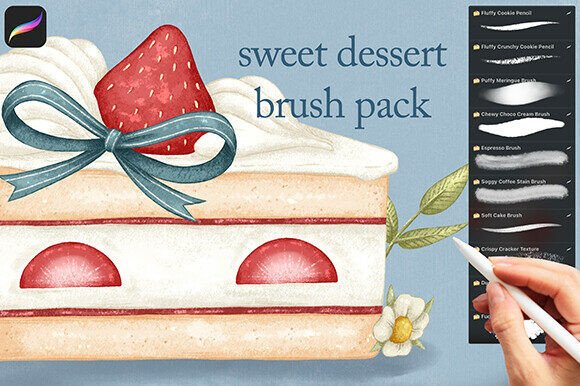
At its core, the Sweet Dessert Procreate Brush Set is a downloadable digital asset that integrates directly into the Procreate app. It contains a total of 20 brushes across four distinct categories: pencils, fillers, textures, and patterns. These brushes are grouped into a single .brushset file, making installation straightforward once the files are properly unzipped and transferred to your iPad.
How the Sweet Dessert Procreate Brush Set Fits Into Your Creative Workflow
Before diving into a new project, many digital artists spend time setting up tools and resources that align with the theme or purpose of their work. The Sweet Dessert Procreate Brush Set is particularly useful in this preparation phase, especially when working on food-related illustrations or whimsical designs centered around desserts.
During the creative process, having a reliable set of brushes can significantly reduce the time spent adjusting stroke settings or layering effects manually. The pencil brushes provide precision for sketching outlines, while the filler brushes offer smooth, even coverage for base colors and shading. Texture brushes add depth and realism, mimicking surfaces like frosting swirls or crumbly crusts. Pattern brushes introduce decorative flourishes that can enhance backgrounds or border elements without requiring custom drawing.
Installation and Compatibility Considerations
Before installation, it's important to ensure that your device meets the technical requirements for using the brush set. The Sweet Dessert Procreate Brush Set is compatible with Procreate 5 and later versions on iPadOS. Users must also have the ability to unzip files, which is typically handled through built-in tools on Mac and Windows devices, or via third-party apps on the iPad.
For those working on a Windows computer, the installation process involves downloading the ZIP file, extracting the contents, and transferring the unzipped files to a cloud storage service like Dropbox or iCloud. From there, you can access the files via the Files app on your iPad and drag them directly into Procreate. Mac users can take advantage of AirDrop for a faster transfer between devices. If you're using only an iPad, you'll need to use a file manager or ZIP-opening app to extract the contents before importing them into Procreate.
Once installed, the brush set becomes part of your Procreate brush library, ready to be used across multiple projects. It's a good practice to organize your brushes within Procreate by creating a dedicated folder for the Sweet Dessert set, which helps maintain efficiency and prevents clutter in your workspace.
Integrating the Brush Set with Other Tools and Assets
The Sweet Dessert Procreate Brush Set works best when combined with other design tools and resources. For instance, if you're creating a menu illustration or a branding concept for a bakery, you might pair these brushes with vector-based assets created in Adobe Illustrator or text overlays designed in Canva. This kind of cross-platform integration allows for a more polished and professional outcome.
When used in conjunction with Procreate's layering and blending features, the texture and pattern brushes can be adjusted for opacity, size, and blending modes to match the lighting and composition of your artwork. This flexibility makes it easier to maintain consistency across different elements of your design, especially when working on multi-layered illustrations or concept art.
Practical Use Cases and Workflow Examples
Let’s say you’re a freelance illustrator working on a commission for a children’s book that features a bakery scene. You can start by sketching the layout using the pencil brushes from the Sweet Dessert set. Once the composition is approved, you can use the filler brushes to block in color and the texture brushes to add visual interest to the pastries and cakes. Finally, the pattern brushes can be used to embellish borders or create decorative elements like cupcake wrappers or cookie designs.
Another example involves content creators who design visual assets for Instagram or Pinterest. If you're creating a themed post around dessert recipes or bakery promotions, the Sweet Dessert brushes can help you quickly generate high-quality visuals without spending excessive time on detailed drawing. This supports a consistent aesthetic across your social media platforms and improves brand recognition.
Long-Term Use and Maintenance
Like any digital asset, the Sweet Dessert Procreate Brush Set benefits from regular maintenance and thoughtful organization. As you use the brushes across different projects, consider saving custom adjustments or variations within Procreate so you can reuse them without reconfiguring settings each time. This not only improves efficiency but also contributes to a more consistent visual style in your work.
Additionally, it's a good idea to periodically back up your Procreate brushes, especially after adding new sets like this one. This ensures that you don’t lose your customizations or purchased assets in case of app updates, device changes, or accidental deletions.
Final Thoughts on Integration and Efficiency
The Sweet Dessert Procreate Brush Set is more than just a collection of digital brushes—it's a practical resource that supports efficient, high-quality design work when creating dessert-themed illustrations. By understanding how to install, organize, and integrate these brushes into your existing workflow, you can reduce setup time and focus more on the creative aspects of your projects.
Whether you're a professional designer, a small business owner creating branded visuals, or a hobbyist exploring digital art, the Sweet Dessert Procreate Brush Set offers a streamlined way to enhance your Procreate experience and bring your dessert-inspired ideas to life with precision and style.