Vintage Artists Tools - Brushes PNGs: A Creative Resource for Digital and Analog Art
What Is Vintage Artists Tools - Brushes PNGs?
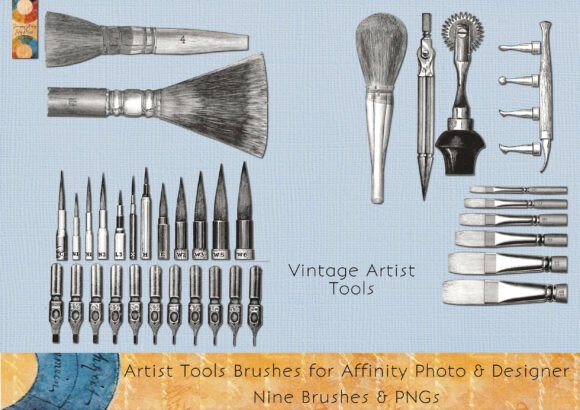
Vintage Artists Tools - Brushes PNGs is a curated digital collection featuring nine vintage-style stamp brushes inspired by a 1920s artist catalog. Designed for use in Affinity Photo and Affinity Designer, these brushes appear in the Pixel Persona as .afbrushes files. Alongside the brushes, users receive a PDF installation guide, a sheet of composite PNG images, and individual transparent PNGs ideal for both digital layering and physical crafting. This package pairs beautifully with watercolor paper kits and journaling tools, enabling creators to design cohesive, vintage-inspired art pieces, tags, cards, or backgrounds.
Common Missteps and How to Avoid Them
While Vintage Artists Tools - Brushes PNGs offers a wealth of creative potential, users—especially those new to digital art or design software—may encounter a few common pitfalls. Recognizing these in advance can save time, reduce frustration, and enhance the quality of your final creations.
Mistake 1: Assuming the Brushes Work in All Design Software
One of the most frequent misunderstandings is believing that the .afbrushes file will work in any design program. These brushes are specifically formatted for Affinity Photo and Designer and only appear in the Pixel Persona. They won’t function in other applications like Photoshop or Procreate without conversion, which may not be straightforward.
Better approach: Before purchasing or downloading, confirm that you're using Affinity Photo or Designer and understand how to switch to the Pixel Persona. If you primarily use other software, consider whether the included PNG files will meet your needs without requiring the brushes.
Mistake 2: Overlooking the Need for Extraction Software
The download arrives as a compressed folder. Some users may double-click expecting it to open automatically, only to find they can’t access the contents. This can be especially confusing for those unfamiliar with file formats or extraction tools.
Better approach: If the folder doesn’t open automatically, download a free extraction tool like 7-Zip or use your operating system’s built-in unarchiving feature. This small step ensures you can access all included files without delay.
Mistake 3: Ignoring the Installation Instructions
Even experienced users can skip reading the PDF guide, assuming they already know how to install brushes. However, the instructions provide specific guidance tailored to the Vintage Artists Tools - Brushes PNGs package, including where to place files and how to access them in the Pixel Persona.
Better approach: Take a few minutes to review the included PDF. It can prevent unnecessary troubleshooting and help you start creating faster, especially if you're unfamiliar with brush installation in Affinity apps.
Mistake 4: Underestimating the Value of PNG Files
Some users focus only on the brushes and overlook the PNG images, which are just as versatile. These transparent images can be layered digitally or printed and cut by hand, offering flexibility beyond the brush format.
Better approach: Explore both the brushes and PNGs. For example, you might use a PNG as a focal point on a digital journal card or print it for a handmade tag. The PNGs also allow you to work outside of Affinity apps, giving you more creative freedom.
Mistake 5: Not Checking Compatibility with Other Kits
Vintage Artists Tools - Brushes PNGs works especially well with the BIG Watercolour Papers and Journal Kit. However, some users may attempt to use it with unrelated kits or templates, expecting the same level of cohesion.
Better approach: If you're aiming for a vintage watercolor theme, ensure your paper and swatch kits match the style. This creates a more polished, professional look and saves time adjusting colors or textures later.
What to Check Before You Buy or Use Vintage Artists Tools - Brushes PNGs
To make the most of this digital download, consider the following before purchasing or opening the file:
- Software compatibility: Do you have Affinity Photo or Designer installed? Can you access the Pixel Persona?
- Storage and extraction: Do you have enough space on your device? Will you need to install extraction software?
- Usage intent: Are you looking for digital brushes, printable images, or both? The package includes both, but your needs may lean one way.
- Design style: Does the vintage 1920s aesthetic fit your current project or brand? If you're aiming for a modern or minimalist look, this kit may not align with your vision.
Maximizing the Value of Your Download
Once you’ve confirmed compatibility and installed the brushes correctly, you can begin integrating Vintage Artists Tools - Brushes PNGs into your creative workflow. Here are a few tips to help you get the most out of the package:
- Layer for depth: Use the transparent PNGs to layer over watercolor textures or scanned paper for a mixed-media effect.
- Customize colors: While the brushes come in their original vintage tones, you can adjust the color in Affinity or overlay with blending modes for a personalized touch.
- Create printables: Print the PNGs on cardstock or sticker paper to create physical embellishments for scrapbooks, planners, or handmade cards.
- Combine with other tools: Pair these brushes with watercolor swatch kits to build a cohesive theme across your digital journal pages or art prints.
Final Thoughts
Vintage Artists Tools - Brushes PNGs is more than just a set of digital brushes—it’s a versatile toolkit that bridges the gap between digital and traditional crafting. By understanding its features and avoiding common mistakes, you can unlock its full potential and elevate your creative projects. Whether you're a digital artist, journal maker, or hobbyist, this collection offers a charming, functional way to bring a touch of the 1920s into your work.