Ornate Tiles 2.0 Procreate Brushes: A Detailed Look at Tile Design for Digital Artists
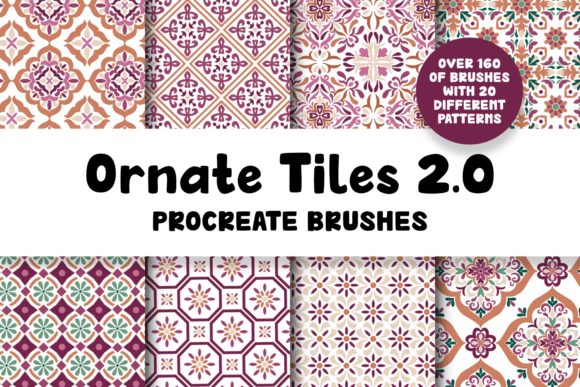
For digital artists using Procreate, the ability to create intricate tile designs efficiently is a valuable asset. Ornate Tiles 2.0 Procreate Brushes offer a specialized set of tools designed to streamline this process. This brush pack includes 20 full tile pattern brushes, each composed of multiple individual brushes, totaling over 160 unique tools. Unlike general-purpose brushes, these are specifically engineered for creating decorative tile effects with layered complexity and color flexibility.
What sets Ornate Tiles 2.0 apart is its multistep pattern functionality. Each brush allows users to apply different colors across layers, resulting in rich, detailed patterns that would otherwise require manual layering or complex brush settings. The updated version includes enhanced brush functions that simplify the workflow, making it easier for both beginners and experienced artists to achieve polished results.
How Ornate Tiles 2.0 Compares to Other Pattern Brushes
When evaluating digital design tools, it's important to understand how Ornate Tiles 2.0 fits within the broader category of pattern brushes. Many pattern brush sets available for Procreate are designed for seamless repeats or general decorative strokes. However, Ornate Tiles 2.0 focuses specifically on tile-based designs, which means the patterns are structured within defined boundaries rather than flowing continuously.
This distinction makes it especially useful for artists creating mandalas, geometric art, or ornamental backgrounds where symmetry and repetition within a tile format are desired. Compared to seamless repeat brushes, which are often used for textile or surface design, Ornate Tiles 2.0 is less suited for infinite tiling but excels in producing self-contained, intricate patterns.
One notable limitation is that these brushes cannot be used to create a fully seamless repeat pattern within Procreate. While the brushes themselves are seamless in their stroke execution, the application’s brush engine does not support exporting patterns that automatically tile without manual adjustments in a separate design program.
Strengths and Limitations of Ornate Tiles 2.0
The primary strength of Ornate Tiles 2.0 lies in its ease of use and the visual complexity it delivers with minimal effort. Artists can layer different colors and textures within a single tile by using multiple brushes from the set, allowing for rich, multi-dimensional designs. The inclusion of a user guide and an organized .brushset file enhances the learning curve, especially for those new to tile-based brushes.
- Pros:
- Highly detailed tile patterns with multistep functionality
- Well-organized brushset with subcategories for quick access
- Includes comprehensive PDF guide and usage instructions
- Designed specifically for Procreate 5+, ensuring compatibility with advanced features
- Cons:
- Inability to create true seamless repeat patterns directly in Procreate
- Requires an Apple Pencil for optimal pressure sensitivity and control
- May be overkill for artists who only need basic pattern brushes
Best Use Cases for Ornate Tiles 2.0
Ornate Tiles 2.0 is particularly well-suited for illustrators, pattern designers, and digital scrapbook creators who frequently work with ornamental or geometric tile designs. For example, someone designing a digital coloring book page with intricate mandalas would benefit from the structured yet flexible nature of these brushes. Similarly, artists working on decorative elements for stationery, book covers, or social media templates can use these brushes to add detailed backgrounds without manually drawing each component.
However, for users focused on creating seamless patterns for fabric design, wallpaper, or large-scale backgrounds, other brush sets or external tools like Adobe Illustrator or Photoshop may be more appropriate. In such cases, artists can still use Ornate Tiles 2.0 for initial tile design and then import the artwork into another program for tiling adjustments.
Technical Requirements and Setup
These brushes are compatible only with Procreate 5 or later versions and require an iPad with Apple Pencil support for optimal performance. The download includes a single .brushset file, which can be imported directly into Procreate, and two PDF documents: one serving as a user guide and the other explaining how to adjust the pattern brush size. At 86 MB, the file size is relatively compact and should install without issues on most modern devices.
Users who are already comfortable with Procreate’s brush settings and layer management will find the transition to Ornate Tiles 2.0 straightforward. Those new to Procreate or digital pattern creation may benefit from spending time with the included guide to understand how to layer multiple brushes for the best results.
When Ornate Tiles 2.0 May Not Be the Right Choice
While Ornate Tiles 2.0 offers a strong set of tools for tile-based pattern creation, it may not be the best fit for every digital artist. Those who primarily work with vector-based designs or need full control over seamless tiling may find Procreate’s limitations restrictive. Additionally, users who prefer minimalistic or hand-drawn brush styles may find the ornate nature of these brushes too structured or decorative for their needs.
For artists who want a broader range of pattern types—including both tile-based and seamless repeat options—considering a more comprehensive brush bundle or mixing Ornate Tiles 2.0 with other brush sets could provide a better balance. It’s also worth noting that while the brushes are highly customizable, achieving the desired effect often requires experimenting with layer blending modes, opacity settings, and color variations.
Final Thoughts on Ornate Tiles 2.0 for Procreate
Ornate Tiles 2.0 Procreate Brushes offer a focused, well-crafted solution for artists looking to create intricate tile designs within Procreate. Its combination of multistep brushes, layered color application, and improved usability in version 2.0 makes it a strong contender in the niche of decorative tile brushes. While it has limitations—particularly regarding seamless tiling—it fills a specific need for artists who value structured, ornamental patterns and want to work efficiently within Procreate’s intuitive interface.
Ultimately, whether Ornate Tiles 2.0 is the right choice depends on the type of artwork you create and your preferred workflow. If your projects frequently involve tile-based patterns and you appreciate the convenience of pre-designed brushes that deliver polished results, this set is worth considering. However, if your needs extend beyond tile formats or require full tiling capabilities, exploring alternative tools or complementary software may be a better investment.