Gothic Jewelry Stamps for Procreate
What Are Procreate Piercing Jewelry Stamp Brushes?
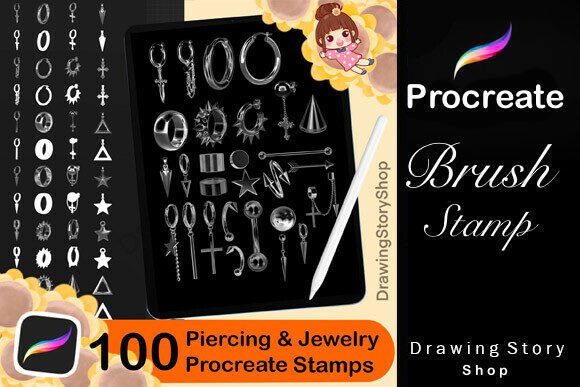
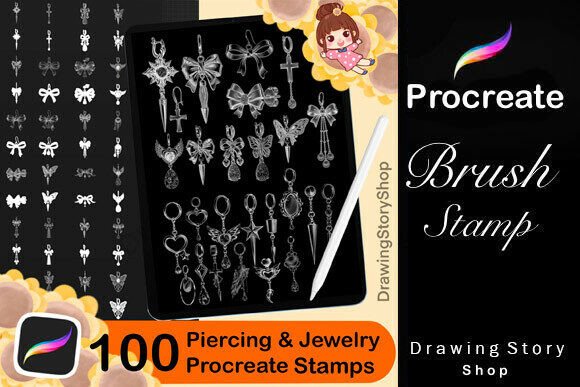
The Procreate Piercing Jewelry Stamp Brush set includes 100 unique digital stamps designed specifically for use within the Procreate app on iPad. These stamps feature gothic, metal-inspired jewelry designs such as earrings, piercings, and ornamental accessories. They allow digital artists to quickly add intricate jewelry elements to their illustrations without having to draw them manually.
Each stamp is a pre-made brush that can be resized, rotated, and layered within your artwork. Whether you're sketching characters, designing fashion illustrations, or creating fantasy portraits, these stamps help bring a unique edge to your digital creations.
Why This Matters for Different Users
Depending on your experience level and creative goals, the value of this brush set can vary significantly. Here's how different users might approach the Procreate Piercing Jewelry Stamp Brush set:
Beginners
For those just starting out with digital art, using pre-made brushes like these can be a great way to experiment with style and composition without needing advanced drawing skills. You can quickly add detailed jewelry to portraits or character designs, helping your artwork feel more polished from the start.
Example: A beginner might use the stamps to enhance a self-portrait with gothic earrings, giving the piece more visual interest without needing to draw each earring from scratch.
Experienced Artists
More experienced users may appreciate the efficiency these brushes offer. While they may be capable of drawing jewelry manually, using stamps can save time—especially when working on large projects or tight deadlines.
Example: A concept artist working on a fantasy character sheet might use multiple stamps to outfit different characters with varied jewelry styles in just a few minutes.
Freelancers & Small Business Owners
For digital creators who sell their work online, these brushes can be used to craft unique digital products like stickers, prints, or social media graphics. The commercial use permission makes them a valuable tool for monetizing your art.
Example: A digital illustrator could create a series of gothic-themed portrait templates using the stamps and sell them as downloadable art kits.
Educators & Tutors
Art educators may find these brushes useful for teaching digital illustration techniques. They provide a practical example of how to use Procreate brushes to enhance artwork and can be part of a broader lesson on digital tools and resources.
Example: In a class on digital character design, students could use the stamps to explore how accessories affect the visual storytelling of a character.
Hobbyists & DIY Creators
Those who enjoy personal creative projects may use these brushes to customize their own artwork, journal pages, or even digital scrapbooks. The flexibility of the stamps allows for creative experimentation without the pressure of perfection.
Example: A hobbyist might use the jewelry stamps to design a personalized digital tarot deck with gothic-themed characters.
Key Considerations When Using These Brushes
When evaluating whether the 100 Procreate Piercing Jewelry Stamp Brushes are right for you, it helps to consider the following factors:
- Learning Curve: No special skills are required to use the brushes, but understanding how to import and manipulate brushes in Procreate will help.
- Cost vs. Value: Compared to hiring an artist or spending hours drawing jewelry manually, this brush set offers a cost-effective shortcut.
- Quality: The brushes are designed for clarity and detail, ensuring they scale well without losing definition.
- Flexibility: You can layer, recolor, and blend the stamps with other brushes to create custom looks.
- Commercial Use: Since the set allows for commercial use of your finished artwork, it’s a smart investment for creators who sell their work.
How to Get Started
After purchasing the brush set, you’ll receive a ZIP file containing all 100 brushes along with a PDF guide explaining how to import them into Procreate. This makes setup straightforward, even for first-time users.
Once imported, you can access the brushes through the Brush Library in Procreate. From there, you can adjust the size, opacity, and blending mode to suit your artwork style.
Real-World Applications
Here are a few ways different users might apply these brushes in their work:
- Character Design: Add ornamental piercings and earrings to characters in comic or fantasy art.
- Portrait Art: Enhance digital portraits with stylish jewelry to match the subject’s personality.
- Product Mockups: Use the stamps to design mockups for jewelry brands or fashion-related digital marketing.
- Pattern Design: Incorporate jewelry elements into background textures or repeated patterns for textile design.
- Social Media Content: Create eye-catching Instagram posts or Pinterest graphics with gothic-themed visuals.
What You Can and Cannot Do
It’s important to understand the licensing terms associated with this brush set:
- You Can:
- Use the brushes in your personal and commercial digital artwork.
- Sell prints, stickers, or digital products featuring artwork made with the brushes.
- Share your finished artwork on social media or portfolio sites.
- You Cannot:
- Resell or redistribute the brushes themselves as digital files.
- Claim ownership of the brush designs or include them in your own brush sets for sale.
- Use the brushes in any way that promotes hate, violence, or illegal activity.
Final Thoughts
The Procreate Piercing Jewelry Stamp Brush set is more than just a digital tool—it’s a versatile resource that can support a wide range of creative goals. Whether you're a beginner exploring digital art for the first time or a professional looking to streamline your workflow, these brushes offer both practicality and creative freedom.
If your work often involves character design, fashion illustration, or digital product creation, this set could be a valuable addition to your toolkit. Just remember to follow the usage guidelines and make sure the brushes are being used in a way that aligns with your project needs and ethical standards.