250 Kawaii Tattoo Stamps for Procreate: A Practical Guide to Avoiding Common Pitfalls
What Exactly Is the 250 Kawaii Tattoo Stamps Pack?
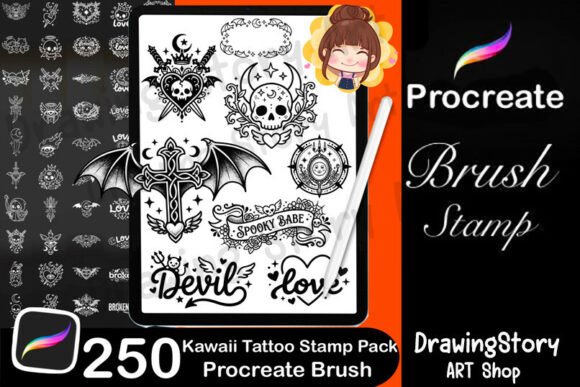
The 250 Kawaii Tattoo Stamps for Procreate is a digital brush pack designed for iPad artists using the Procreate app. It includes a variety of cute, gothic, and minimalist tattoo designs that can be used for concept sketches, social media content, or print-on-demand products. With elements like anime-style icons, decorative frames, and tattoo text, this pack aims to streamline the creative process for illustrators, tattoo artists, and designers alike.
Why People Are Interested in This Pack
Whether you're a beginner exploring digital art or a small business owner looking to create branded stickers or apparel, this pack offers a wide range of design flexibility. Its compatibility with Procreate makes it especially appealing to mobile digital artists. However, like many digital tools, it's easy to overlook certain aspects that can affect how effectively you use it.
1. Assuming All Stamps Are Ready to Use Without Adjustment
While the pack includes 250 stamps, not every design will work perfectly in every context. Some may need resizing, rotation, or blending adjustments to fit your composition. Don't just stamp and assume it's done — take a moment to tweak the pressure, opacity, or layer blending to make the design feel more integrated.
Better approach: Test each stamp on a new layer before committing. Adjust settings like Alpha Lock or Color Dynamics to match your artwork's style.
2. Ignoring the Included Gothic and Decorative Elements
Many users focus only on the cute or anime-style icons and overlook the 40 gothic elements and 20 decorative frames. These can be used to add contrast, depth, or framing to your designs — especially useful for concept art or sticker sheets.
Better approach: Combine kawaii and gothic elements to create unique hybrid designs. For example, place a cute character inside a gothic-style frame to enhance visual storytelling.
3. Using Stamps as Final Art Without Customization
Some creators drop in a stamp and consider it finished. While the designs are high quality, using them as-is can lead to generic-looking work. This can be especially noticeable when selling digital prints or stickers online — uniqueness matters.
Better approach: Layer stamps with hand-drawn elements or add shading and texture. This helps your art stand out and avoids the "template" look.
4. Misunderstanding the Licensing Terms
A common oversight is misunderstanding what you can and can't do with the pack. You're allowed to use the stamps in your artwork and sell the results — but you cannot resell or redistribute the brushes themselves.
Better approach: Always credit the brush pack in your project descriptions (e.g., “Includes stamps from 250 Kawaii Tattoo Stamps for Procreate”) to stay transparent and compliant.
5. Not Checking Compatibility Before Purchase
This pack is designed for the Procreate app on iPad. If you're using a different platform like Photoshop or Illustrator, these brushes won't work. Make sure you're using the right software before buying.
Better approach: Check the product description thoroughly. If unsure, reach out to the seller with any technical questions before purchasing.
How These Mistakes Can Affect Your Results
Overlooking these details can lead to wasted time, subpar results, or even legal issues. For example, using unmodified stamps in a commercial product may make your design appear less original. Misunderstanding licensing terms could result in your store being flagged for selling unauthorized assets. Even technical issues like incorrect brush settings can make your work look flat or unpolished.
What to Check Before Buying or Using the 250 Kawaii Tattoo Stamps
- Do you own an iPad with Procreate installed? These brushes won’t work elsewhere.
- Have you read the license agreement? Make sure you understand what you can and cannot do with the files.
- Is the pack compatible with your current Procreate version? Most are, but it’s worth confirming.
- Are you prepared to customize the stamps? They’re tools, not finished designs.
Maximizing Value: Practical Tips for Getting the Most from This Pack
Think of the 250 Kawaii Tattoo Stamps for Procreate as a foundation — not a shortcut. Here’s how to get the most from it:
- Organize your brushes into custom brush sets by category (e.g., frames, text, icons) for faster access.
- Use stamps as underdrawings — lay down a base with a stamp, then build your own details on top.
- Combine multiple stamps to create complex compositions without drawing everything from scratch.
- Experiment with pressure and blending — not all stamps look best at 100% opacity.
Real-World Example: Using the Pack for a Merch Design
Let’s say you're creating a sticker pack for Etsy. You choose a cute stamp from the pack, but instead of using it alone, you place it inside one of the decorative frames and add a custom background. You then adjust the color palette to match your brand and add a hand-drawn border. The result? A sticker that feels original and professional — not like a template.
Final Thoughts: A Smart Investment for the Right User
The 250 Kawaii Tattoo Stamps for Procreate can be a valuable asset for creators across many fields — from tattoo designers to social media marketers. But like any creative tool, its effectiveness depends on how thoughtfully you use it. By avoiding common missteps and understanding the pack’s full potential, you can save time, improve your workflow, and create more compelling digital art.